







BUILDING INFORMATION MODELING (BIM)

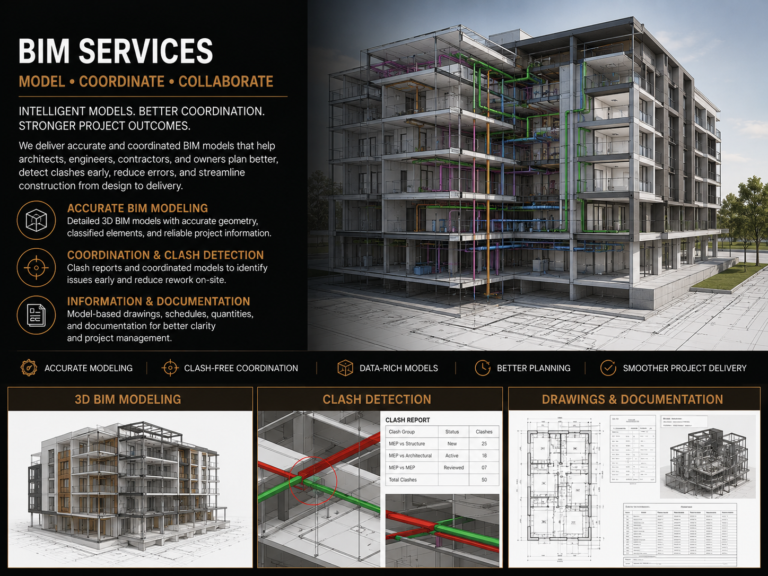
Revit-based BIM models developed with accurate geometry, LOD requirements, worksets, families, parameters, schedules, clash coordination, shared coordinates, and model-based documentation for better project delivery.

Rendrix Studio provides BIM modeling and coordination support for architects, contractors, consultants, engineers, and construction teams. We develop structured Revit models with accurate geometry, model data, families, parameters, sheets, schedules, and coordination-ready views.

Our BIM workflow supports design development, construction documentation, clash coordination, quantity takeoff, as-built modeling, and model-based project delivery.

Our team can work from CAD files, PDFs, Revit models, IFC files, point cloud data, consultant models, redline markups, and project BIM execution requirements. We focus on creating clean, coordinated, and usable models that support both documentation and construction coordination.

building information modeling (bim)

Software Proficiency

Get a free quote

24 hours. That’s all it will take you to figure out the cost benefits of outsourcing

    To upload files, please use contact form contact form

    Services We Provide!

    Revit BIM Modeling
    Revit models developed with proper levels, grids, walls, floors, ceilings, doors, windows, roofs, stairs, components, rooms, areas, families, parameters, and project information based on the required LOD.
    CAD to BIM Conversion
    Conversion of 2D CAD drawings, PDFs, sketches, and legacy documentation into intelligent BIM models with coordinated plans, elevations, sections, schedules, and drawing sheets.
    Scan to BIM Modeling
    Point cloud to BIM modeling for renovation, as-built, and existing condition projects. We use scan data to create accurate models reflecting actual site conditions, geometry, levels, openings, and major building elements.
    BIM Coordination
    Model coordination between architectural, structural, MEP, ceiling, interior, and millwork models using linked models, shared coordinates, discipline coordination views, and clash review workflows.
    Clash Detection Support
    Clash review support using federated models, Navisworks-style coordination, clash reports, issue tracking, and coordination markups to identify conflicts before they reach site.
    LOD-Based Model Development
    Model development based on project LOD requirements, from design-level massing and layout models to detailed construction coordination models with accurate components and technical data.
    Revit Family Creation
    Custom Revit families for doors, windows, furniture, fixtures, millwork, equipment, casework, lighting, and project-specific components with required parameters, materials, visibility settings, and scheduling data.
    Quantity Takeoff Support
    BIM-based schedules and quantity extraction for doors, windows, rooms, areas, materials, finishes, casework, fixtures, and other model-based components.
    As-Built BIM Modeling
    As-built model updates based on site markups, redlines, field changes, point cloud data, contractor inputs, and record drawings for final documentation and facility reference.

    Why should you partner with Rendrix Studio?

    Clean Revit Model Structure

    We maintain organized views, sheets, worksets, families, schedules, parameters, and linked files so the model remains easy to manage.

    Coordination-Ready Models

    Our models are prepared for design review, clash detection, documentation, and consultant coordination.

    Project-Specific BIM Standards

    We can follow your BEP, Revit template, title block, LOD matrix, family standards, shared coordinates, file naming, and sheet protocols.

    Reduced Coordination Risk

    BIM helps detect conflicts between architecture, structure, MEP, interiors, ceilings, and millwork before they become field problems.

    Model-Based Documentation

    Plans, elevations, sections, schedules, and details remain better coordinated because they are extracted from the model.

    Scalable BIM Support

    We can support one-time modeling tasks, ongoing Revit documentation, CAD to BIM conversion, scan to BIM, or full project coordination support

    Internal QA/QC Review

    Before delivery, we check model structure, linked files, worksets, geometry, dimensions, annotations, schedules, sheets, and coordination views to reduce errors.

    Flexible Project Support

    Whether you need CAD to BIM, Scan to BIM, Revit modeling, clash detection support, or BIM construction documentation, we can support your workflow based on the project scope.

    Industries We Support

    At Rendrix Studio, we create BIM models from architectural drawings, CAD files, PDFs, sketches, point cloud references, consultant models, and project-specific standards. Depending on the required scope, our models can support design development, construction documentation, clash coordination, quantity takeoff, shop drawing coordination, and as-built documentation.

    Residential

    Hospitality

    Residential
    Corporate

    Industrial

    Institutional

    Retails

    Educational

    Client’s Saying…

    Standards & Specifications We Work With

    We work with Revit models, CAD files, IFC files, point cloud data, consultant inputs, LOD requirements, shared coordinates, worksets, family libraries, and client BIM standards to develop clean, coordinated, and documentation-ready models.


    1. Revit Models, CAD Files, PDFs & IFC Files
    2. Client BIM Execution Plan / BEP
    3. LOD Requirements — LOD 100, 200, 300, 350, 400
    4. Revit Templates, View Templates & Worksets
    5. Shared Coordinates & Linked Consultant Models
    6. Architectural, Structural & MEP Coordination Files
    7. Point Cloud / Scan Data References
    8. Family Libraries, Parameters & Schedule Standards

    Need BIM Support for Your Project?

    Send us your CAD files, Revit model, PDFs, IFC files, point cloud data, or BIM requirements. Our team will review the scope, required LOD, coordination needs, and deliverables before providing a clear quote and timeline.


    FAQs

    Building Information Modeling FAQS

    What is Building Information Modeling, or BIM?
    BIM is a model-based process used to create, manage, and coordinate building information. A BIM model includes 3D geometry, levels, grids, families, parameters, schedules, sheets, and project data that support design, documentation, coordination, and construction planning.
    What BIM software do you work with?
    We mainly work with Autodesk Revit for BIM modeling and documentation. For coordination workflows, we can also work with linked models, IFC files, Navisworks-style clash reports, consultant models, and project-specific BIM standards.
    What LOD can you model?
    We can develop BIM models based on the required LOD, such as LOD 100, 200, 300, 350, or 400, depending on the project scope. The final level of detail is always confirmed before starting the work.
    What information do you need to start a BIM project?
    We usually need CAD files, PDFs, Revit models if available, IFC files, point cloud data if applicable, scope of work, required LOD, BIM standards, title block, consultant models, and any project-specific documentation requirements.
    Do you provide clash detection support?
    Yes. We can support clash detection by reviewing architectural, structural, MEP, ceiling, interior, and millwork models. We help identify conflicts between building systems, openings, services, clearances, and construction elements before they reach the site.
    Can you follow our BIM standards?
    Yes. We can follow your BIM Execution Plan, Revit template, title block, view templates, worksets, shared coordinates, naming conventions, family standards, sheet setup, annotation style, and documentation protocols.
    Can you create custom Revit families?
    Yes. We create Revit families for architectural components, millwork, furniture, fixtures, equipment, casework, doors, windows, and project-specific elements with required parameters, materials, visibility settings, and scheduling data.
    How do you ensure BIM model quality?
    Before issuing, we review model structure, levels, grids, worksets, linked files, view setup, family naming, parameters, sheets, schedules, dimensions, annotations, and coordination requirements to keep the model clean and usable.
    OUR LATEST

    BLOGS – Building Information Modeling

    We always update the latest news about our company aswell as architecture news around the world, click subscribe and follow daily news from us.

    Rendrix Studio

    The best living environment for your family.

    1147 Brookforest Ave Shorewood, IL 60404